
Register Your Company or Login to BMO Portal
- Company registration access
- Email activation confirmation
- Login link for existing users
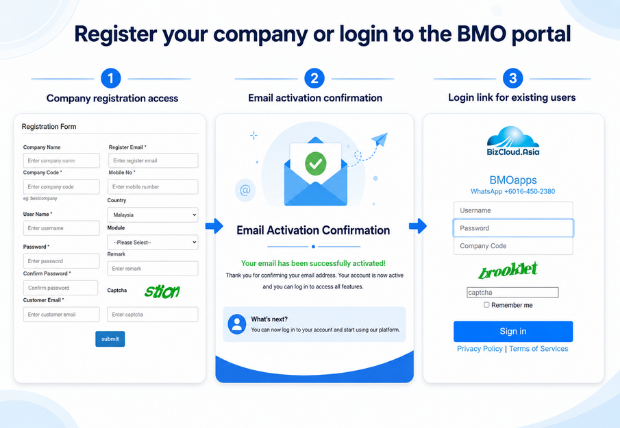
Simple Registration Flow Before Login
Follow the same steps shown in the original page, now arranged in a cleaner POSMarket layout for customers and existing users.
Register your company
Submit the company registration form through the BMO registration module.
Check your email
Open the email inbox used during registration and look for the activation email.
Activate My Account
Click the Activate My Account link in the email to continue account activation.
Login after confirmation
After the confirmation email is received, login to the BMO portal.
Register or Login to BMO
The registration module is loaded from the BMO login portal. Existing users can also go directly to the login page.
Registration & Login Questions
Quick answers for customers who want to register a company account or access the BMO portal.
Where do I register?
You can register using the BMO Registration Module shown on this page.
How do I activate my account?
After registration, check your email and click Activate My Account from the activation email.
Can existing users login here?
Yes. Existing users can click Login Here to open the BMO login portal.
What if the form does not load?
Use the Login Here button or contact POSMarket support through WhatsApp for assistance.
Having Trouble Registering or Logging In?
Contact POSMarket support if your activation email is not received, the registration module does not load or you are unsure which account to use.